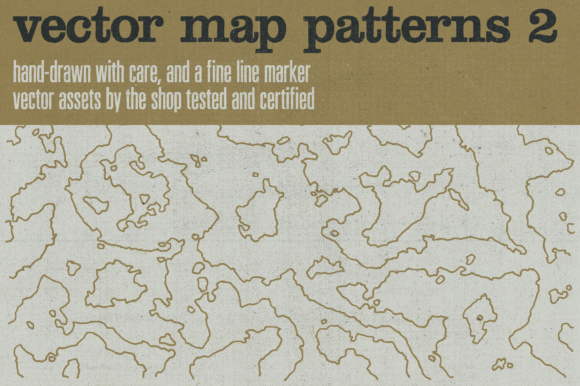
Hand-drawn Vector Maps Volume 2: A Resource for Designers and Artists
If you're a designer, illustrator, or artist looking to add depth and character to your projects, Hand-drawn Vector Maps Volume 2 is a valuable resource. This collection of intricate line patterns was created to mimic the topography lines found in maps, architectural drawings, and other technical illustrations. Each pattern is meticulously drawn using a fine line on white paper, then carefully scanned at 1200 ppi, cleaned up, and converted into vector assets. The result is a versatile set of design elements that can be used across a wide range of creative applications.
Understanding the Need for Hand-drawn Vector Maps
In today’s fast-paced digital world, designers often rely on tools and templates to streamline their workflow. However, there's a growing demand for handcrafted, authentic elements that bring a sense of texture and personality to digital work. Whether you're creating mockups, branding materials, or UI components, Hand-drawn Vector Maps Volume 2 offers a unique solution that bridges the gap between digital precision and artistic expression.
One of the main challenges designers face is finding high-quality, customizable assets that maintain visual integrity across different formats. Traditional vector maps can sometimes feel too rigid or formulaic, while hand-drawn elements may lack the scalability needed for professional use. Hand-drawn Vector Maps Volume 2 addresses this by combining the organic feel of hand-drawn art with the flexibility of vector graphics, making it an ideal choice for those who want both aesthetic appeal and technical functionality.
What Makes Hand-drawn Vector Maps Volume 2 Unique?
Hand-drawn Vector Maps Volume 2 consists of twenty distinct line patterns, each designed to replicate the subtle variations found in real-world topographic maps. These patterns are not only visually appealing but also highly adaptable. Each drawing was created with care using a fine line, ensuring that every stroke contributes to the overall composition. After scanning, the artwork was meticulously cleaned up and converted into vector format, preserving the original detail and allowing for easy customization.
The package includes multiple file types to suit different needs. High-resolution transparent PNGs are especially useful for maintaining transparency variation in the inking work, which is essential for layered designs or overlays. Meanwhile, bitmap TIFF versions feature high-density halftone patterns, offering excellent line definition and contrast. This variety ensures that users can choose the best format for their specific project requirements.
Practical Applications of Hand-drawn Vector Maps Volume 2
Whether you're working on a website, print layout, or graphic design project, Hand-drawn Vector Maps Volume 2 can enhance the visual storytelling of your work. Here are a few practical applications:
- Branding and Identity Design: Use these patterns as background textures or decorative elements to add depth and character to logos, packaging, or marketing materials.
- User Interface (UI) Design: Incorporate the line patterns into UI elements such as buttons, icons, or backgrounds to create a more tactile and engaging user experience.
- Architectural and Technical Illustrations: These patterns can serve as reference guides or background layers in architectural sketches, helping to convey spatial relationships and terrain features.
- Artistic Projects: Artists and illustrators can use these vectors as inspiration or base elements for larger compositions, blending digital and traditional techniques.
By integrating Hand-drawn Vector Maps Volume 2 into your workflow, you can achieve a balance between creativity and efficiency. The ability to scale, edit, and layer these elements makes them incredibly versatile for both personal and commercial projects.
How Different Users Can Benefit from This Resource
The value of Hand-drawn Vector Maps Volume 2 lies in its adaptability. For a designer working on a client project, these patterns can help elevate the final output with a touch of authenticity. For an independent artist, they offer a starting point for exploring new creative directions. And for educators, they can serve as teaching tools to demonstrate the intersection of hand-drawing and digital design.
Each user may approach the resource differently based on their goals. Some might prefer using the vector files directly in Adobe Illustrator or InDesign, while others may experiment with the PNG and TIFF versions in Photoshop or Procreate. Regardless of the medium, the key is to leverage the organic quality of the hand-drawn elements to create something unique and meaningful.
Considerations for Implementation
When incorporating Hand-drawn Vector Maps Volume 2 into your projects, consider the following:
- File Compatibility: Ensure that the chosen file format (AI, PDF, EPS, PNG, or TIFF) is compatible with your design software.
- Layering and Transparency: Experiment with layering the patterns over other design elements to achieve the desired visual effect.
- Customization: Use the vector files to modify the patterns as needed, adding or removing lines to suit your design vision.
- Resolution and Scaling: Always check the resolution of the files when scaling for print or web use to maintain clarity and detail.
With careful implementation, Hand-drawn Vector Maps Volume 2 can become an essential part of your creative toolkit, offering both aesthetic value and functional versatility.